How it All Works
From Hardware on the bench to live control in your browser.
Section 1
The Five-Layer Stack
IotGrid is organized into five layers that work together so a smart device can be built, connected, and operated from a browser. Each layer has a clear job; together they turn a circuit on a bench into something you can monitor and control at portal.iotgrid.org.
Hardware layer
We design our systems around Espressif ESP32 development boards, integrating sensors, relays, and supporting circuitry and power sources like Li-ion batteries.
Each device begins as a breadboard prototype and evolves into a soldered perfboard assembly with proper power regulation, and clean wiring — transforming ideas into reliable hardware units.
Firmware layer
Once the hardware is in place, we write firmware in C++ using Arduino sketches on the ESP32. We use built-in WiFi for networking, FreeRTOS for concurrent work, and non-blocking patterns so sensors, MQTT, and HTTPS can run without stalling each other.
Devices publish readings and receive commands over MQTT at mqtt.iotgrid.org (TLS). HTTPS to api.iotgrid.org handles device registry, authentication, and over-the-air (OTA) firmware downloads. Shared C++ in our library keeps every sketch from reimplementing common utilities like authentication and OTA.
The result is responsive, network-aware embedded software that can run reliably in real-world conditions.
Messaging layer
Devices communicate through a MQTT broker over TLS at mqtt.iotgrid.org, using a publish-subscribe architecture.
We use QoS 1 (at least once delivery) to balance reliability and performance so distributed devices and backend services stay in sync.
This publish-subscribe layer decouples devices from application logic — the broker can scale as we add gadgets, processors, and dashboards without updating firmware on devices.
Backend layer
The backend at api.iotgrid.org is Node.js, storing sessions, device metadata, ownership, firmware versioning, and user records. It also securely maintains versioned firmware binaries for Over-the-Air (OTA) updates.
It bridges MQTT and WebSockets: telemetry and commands flow between the broker and the front layer in real time. Python preprocessors optionally refine sensor readings or route commands conditionally before the front layer sees them.
Front layer
The front layer is portal.iotgrid.org — built with TailwindCSS, StimulusJS, and Socket.io for live updates.
After HTTPS authentication, the dashboard lets people monitor devices, send commands, and receive live telemetry over a persistent WebSocket connection to the backend.
Section 2
Device authentication & provision

Device authentication
HTTPS to api.iotgrid.org — provision secret, then access and refresh tokens.
Device — api.iotgrid.org
Provision secret
Embedded in firmware at first flash
Access token
Short-lived
Refresh token
Long-lived
Each device is registered with a unique provisioning secret, embedded in firmware at first flash. Devices authenticate to api.iotgrid.org over HTTPS, then maintain session with short-lived access tokens and long-lived refresh tokens.
Section 3
Data flow
Telemetry
Devices publish sensor readings to the MQTT broker on their respective topics. The backend at api.iotgrid.org subscribes and relays telemetry toward the front layer. Python preprocessors may refine or transform readings before they reach the portal. The portal then pushes live updates to authenticated users over WebSockets via Socket.io.
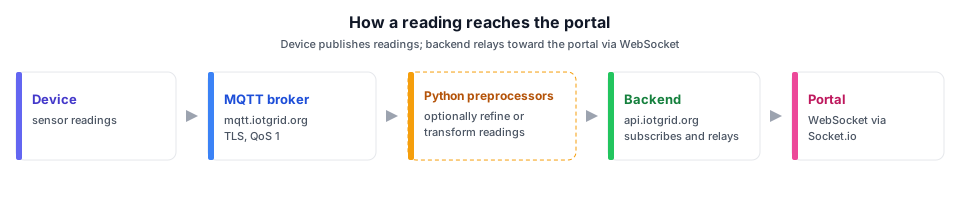
How a reading reaches the portal
Device publishes readings; backend relays toward the portal via WebSocket.
Device
Sensor readings
MQTT broker
mqtt.iotgrid.org
Python preprocessors
Optionally refine or transform readings
Backend
api.iotgrid.org — subscribes and relays
Portal
WebSocket via Socket.io
Commands
Commands take the reverse path. A control in the dashboard does not call the device over HTTP directly. StimulusJS sends the command over Socket.io; the server checks authorization, then publishes to the device’s commands topic on MQTT. Python preprocessors, scheduled jobs, or other devices can publish commands too — we own the broker and firmware, so automation does not require a vendor API.
Newer devices use v2 commands with an ISO-8601 timestamp. Stale or invalid timestamps are rejected so replayed commands do not slip through.
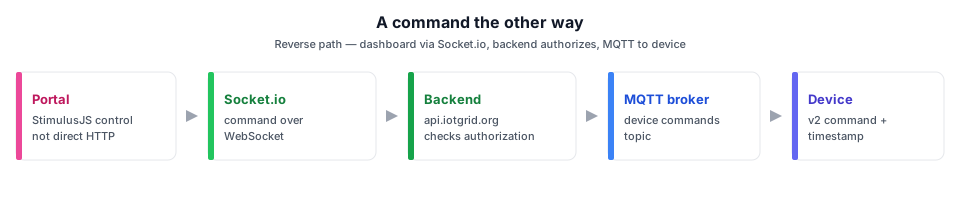
A command the other way
Reverse path — dashboard via Socket.io, backend authorizes, MQTT to device.
Portal
StimulusJS control — not direct HTTP
Socket.io
Command over WebSocket
Backend
api.iotgrid.org — checks authorization
MQTT broker
Device commands topic
Device
v2 command + timestamp
On MQTT connect, devices also publish their firmware and protocol version so the backend can record what is running — keeping portal and device in sync for seamless communication.
Section 4
Device state discovery
MQTT alone does not tell the browser that a device is online. When someone opens a device on the portal, the front end echoes with a unique id. That ping is piped through the backend to the device via MQTT (as described in data flow). The device responds with echo-back, routed back to the same browser connection. After a successful echo, the device publishes its current state — for example a switch reports ON/OFF.
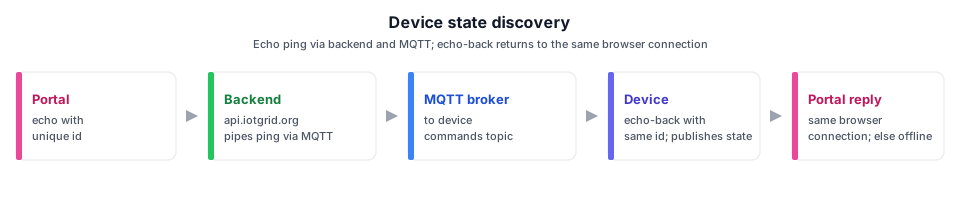
Device state discovery
Echo ping via backend and MQTT; echo-back returns to the same browser connection.
Portal
Echo with unique id
Backend
api.iotgrid.org — pipes ping via MQTT
MQTT broker
Device commands topic
Device
Echo-back with same id; publishes state
Portal reply
Same browser connection; timeout → offline
The portal checks that the viewer is authenticated and allowed to access that device before sending the echo. If no response arrives within a timeout, the UI treats the device as offline.
Section 5
Over-the-Air (OTA) firmware updates
We do not push firmware over MQTT. The backend keeps firmware versions and their binaries for each device type, and tracks which version each device is running.
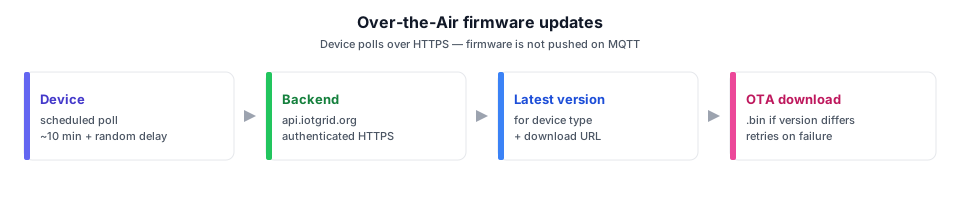
Over-the-Air firmware updates
Device polls over HTTPS — firmware is not pushed on MQTT.
Device
Scheduled poll (~10 min + random delay)
Backend
api.iotgrid.org — authenticated HTTPS
Latest version
For device type + download URL
OTA download
.bin if version differs — retries on failure
On a schedule — about every ten minutes, plus a little extra random delay so many devices do not flood the API — each device polls api.iotgrid.org over HTTPS using the authentication described in section 2. In each poll it asks the backend for the latest version available for its device type, along with a download URL. It compares that to the version compiled into its firmware. If they differ, it downloads the new image over HTTPS from the backend, which streams the .bin file, with retries if the download fails.
Two app slots (A/B). ESP32 over-the-air (OTA) uses two firmware partitions. The new image is written to the inactive slot. If power fails mid-write, the old slot still boots — a safe forward path for firmware migration.
Section 6
Users' authentication and authorization
Authentication
People at portal.iotgrid.org sign in with username and password. Sessions are maintained as a rolling sessions of about 30 days. The main dashboard uses that session.
Device pages and Socket.io also accept a JSON Web Token (JWT) — a token tied to specific device(s) rather than a full portal login. That path suits browser shortcuts and home-screen icons on a phone or desktop: open one gadget directly without signing into the whole dashboard.
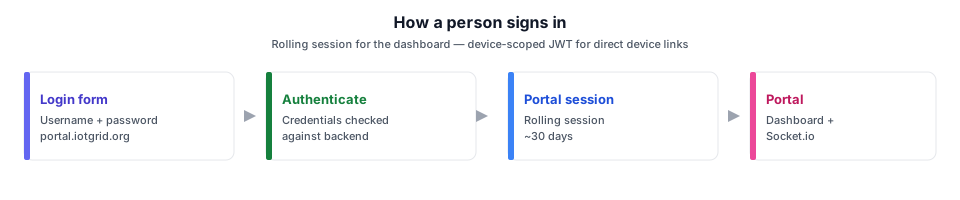
How a person signs in
Rolling session for the dashboard. A device-scoped JWT is an alternate path for direct device links.
Login form
Username + password
Authenticate
Credentials checked against backend
Portal session
Rolling ~30 days
Portal
Dashboard + Socket.io
Authorization
Being logged in is not enough. The portal only renders a device page or forwards a command if the user is allowed to access that device. Ownership and permissions live in the backend; the same check applies to the dashboard, single-device views, and real-time commands over Socket.io.
Device-scoped user JWTs grant access only to the device(s) named in the token — intended for direct links and shortcuts, not as a replacement for normal login on the full dashboard.
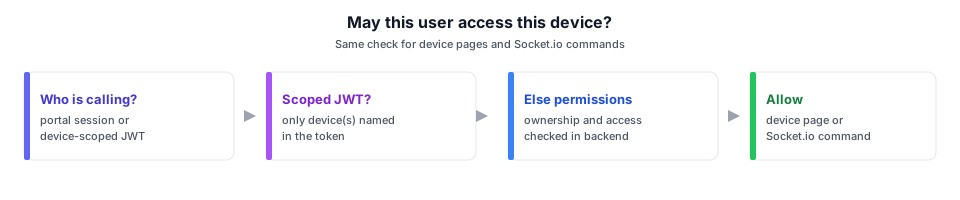
May this user access this device?
Same check for device pages and Socket.io commands.
Who is calling?
Portal session or device-scoped JWT
Scoped JWT?
Only device(s) named in the token
Else permissions
Ownership and access checked in backend
Allow
Device page or Socket.io command
Section 7
Firmware practices
Background auth and OTA cycle
Device authentication and firmware checks run on a jittered schedule (section 5). Battery-powered devices wait until that cycle is idle before entering deep sleep.
Non-volatile storage (NVS) persistence
Authentication + WiFi credentials, and gadget preferences survive reboots in ESP32 non-volatile storage.
Device Onboarding
First boot — or a long button press — opens a local captive portal to enter the home network. Devices that are Hard-to-reach after deployment can reopen that portal automatically if the saved WiFi stays unreachable for several minutes.
MQTT safety
QoS 1 on publishes. v2 commands require a valid clock-backed timestamp; stale commands are rejected. Common commands (e.g. echo) are handled in shared classes; device-specific logic stays in each firmware code.
Deep sleep (battery devices)
Where we use it (e.g. battery-powered tank monitoring), timer-based deep sleep waits until auth and over-the-air (OTA) work finishes so we do not cut power mid-update. Mains-powered devices stay awake and keep MQTT connected.
Feedback and resilience
A Buzzer installed in the devices gives audible success or rejection feedback. Periodic heartbeat messages report device health. Firmware and protocol version are announced when MQTT connects.
Shared sensors and actuators
Reusable sensor wrappers (environmental, light, temperature, power) and Switch (relay modes, timed auto-off, persisted state) keep hardware logic out of individual device sketches.
Section 8
Potential Improvements
Additional radios
Zigbee and other radios are on the roadmap — not part of the current WiFi + MQTT stack.
Portal scheduling UI
Because we own firmware and the broker, we can already automate with scheduled jobs and MQTT. A scheduling UI in the portal would be the natural next step for managing those rules from the dashboard.